The FTC just put a $1 million price tag on lying about ADA compliance, and the era of slapping an "AI-powered" widget on your Shopify store and calling it accessible is officially done. But here's the twist: AI is finally starting to deliver on the accessibility promise the overlay industry made and broke. The difference is where the AI is pointed.
If you're a Shopify merchant still relying on an accessibility overlay app, or you're trying to make sense of the new wave of AI accessibility tools, this post is for you. We'll cover what Shopify ADA compliance actually requires, what the FTC's accessiBe ruling means for the AI accessibility space, and the new generation of AI-powered Shopify accessibility apps and tools that fix the underlying code instead of pretending to.
The accessiBe Reckoning: A Watershed Moment for Shopify ADA Compliance
Let's start with the news that should have been a much bigger deal in the Shopify ecosystem than it was.
In January 2025, the Federal Trade Commission filed a complaint against accessiBe, the largest and most aggressively marketed accessibility overlay vendor in the world. The allegations were not subtle. The FTC said accessiBe had been falsely claiming its AI widget could make any website WCAG-compliant when it demonstrably couldn't. It also accused the company of running paid endorsements disguised as independent reviews, blog posts, and editorial content. In April 2025, the Commission approved the final order: $1 million in penalties, plus a 20-year prohibition on accessiBe making compliance guarantees unless it can actually prove them.
This is a watershed moment for Shopify ADA compliance, and it deserves to be treated as one. A federal regulator just looked at the entire overlay industry's central marketing claim, "install our script and you're compliant," and declared it deceptive. Not "needs more disclosure." Not "could be improved." Deceptive. As in, illegal.
And yet, walk through the Shopify App Store today and you'll still find dozens of accessibility overlay apps making the exact same kinds of claims. Merchants install them, sleep better at night, and never realize they're sitting on the same pile of legal risk they were before, plus a monthly subscription.
What Does Shopify ADA Compliance Actually Require?
The ADA itself doesn't spell out specific web standards. What's happened over time is that courts, the DOJ, and regulatory bodies have pointed to WCAG (Web Content Accessibility Guidelines) as the benchmark. For Shopify merchants, WCAG 2.1 Level AA is the target.
Meeting WCAG 2.1 AA on a Shopify store means hitting criteria like:
- Color contrast ratios of at least 4.5:1 for normal text
- Full keyboard operability for every interactive element on your site
- Proper alt text on every product image and decorative graphic
- Programmatically determinable names and roles for all UI components (via semantic HTML and ARIA)
- Visible focus indicators on every interactive element
- Form inputs with associated labels and clear error messaging
- Semantic document structure with a logical heading hierarchy
The scope is bigger than most Shopify merchants realize. It's not just "add alt text to your product images." Shopify ADA compliance touches your mega menu, your product filters, your cart drawer, your variant selectors, your quick-view modals, your quantity steppers, your announcement bar, your checkout flow, and every interactive block your theme ships with. A typical Dawn-based or custom Shopify build can have hundreds of individual WCAG violations across a few dozen sections and snippets. Third-party Shopify apps drop their own markup into the DOM, which often introduces its own set of accessibility issues independent of your theme code.
Can You Be Sued If Your Shopify Store Isn't ADA Compliant?
Short answer: yes, and it happens constantly.
Over 5,000 digital accessibility lawsuits were filed in 2025, up nearly 20% from the prior year. Shopify stores are disproportionately targeted because they're transactional - it's straightforward for a plaintiff to demonstrate that a barrier prevented a purchase. Demand letters routinely cite specific Shopify pain points: "couldn't select a size variant with a screen reader," "keyboard focus was trapped in the cart drawer," "checkout form fields had no associated labels."
Settlements typically run from $5,000 to $50,000 per case for small to mid-sized merchants, with larger brands often paying significantly more. And once a demand letter arrives, your only options are to settle or remediate fast.
Why Shopify Accessibility Overlays Don't Work
Overlay widgets have been the go-to quick fix for a few years now, and there are plenty of them listed in the Shopify App Store. They inject JavaScript that attempts to modify the DOM at runtime, adding ARIA labels, adjusting contrast, and providing keyboard shortcuts. The pitch is appealing: install the app, flip it on, and your Shopify store is compliant.
The problem is architectural. Overlays operate on the rendered page, not the source. They can't fix issues baked into your Liquid templates, your theme sections, or the markup rendered by your installed apps. A screen reader parsing the underlying HTML still encounters the same broken heading hierarchy, the same unlabeled inputs, the same focus traps in your cart drawer. The overlay might paper over some of it visually, but assistive technology often sees right through it.
This is why the disability advocacy community has been raising the alarm on overlays for years. It's why over 700 accessibility experts signed an open letter telling people not to use them. It's why plaintiffs' attorneys specifically target sites running accessibility widgets - the overlays are easy to defeat and demonstrate as ineffective in court. The FTC just made the legal and regulatory case official.
If you're a Shopify merchant relying on an overlay app, the question isn't whether your protection is real. The FTC has answered that. The question is what you do now.
AI-Powered ADA Compliance: Where the Overlays Got It Wrong (and the New Tools Got It Right)
Here's the nuance worth pulling out of the accessiBe story. The FTC didn't fine accessiBe because it used AI. It fined accessiBe because its AI was pointed at the wrong layer of the stack.
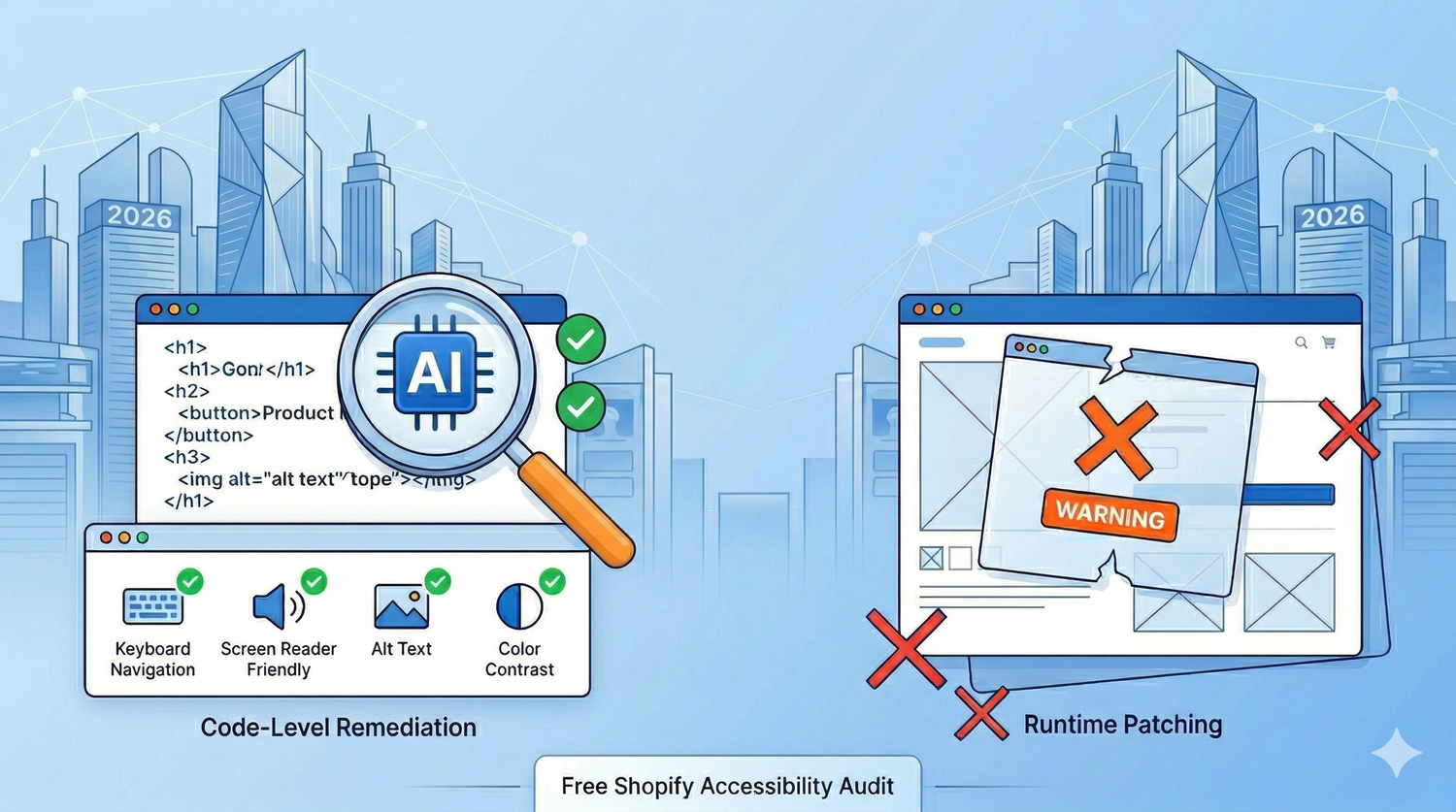
Overlay AI tries to interpret a rendered DOM in the browser and patch it on the fly. It's guessing at intent: is this <div> actually a button? Is this image decorative or meaningful? Should this control be in the tab order? Doing that reliably across millions of unique pages, in real time, with no context, turns out to be impossible. So the AI gets it wrong constantly, and the user with a screen reader is the one who suffers.
The new wave of AI-powered ADA compliance tools flips the model. Instead of patching the rendered page, AI is pointed at your source code, where it has full context: your Liquid templates, your component structure, your product data, your design system. It can reason about a <button> in your theme alongside the data and behavior it's tied to, propose a precise fix, and write that fix as a real code change a developer can review.
That distinction (AI as a runtime patcher versus AI as a code-level remediation engine) is the entire ballgame. It's the difference between an FTC enforcement action and a tool that actually moves your store toward WCAG compliance. Both Patrol and TestParty sit firmly on the right side of that line.
The New Generation of AI-Powered Shopify Accessibility Apps
The good news is that a new generation of Shopify ADA compliance tools is emerging that actually does what overlays only pretended to do. Both Patrol and TestParty share the same fundamental approach: AI scans your site, identifies WCAG violations, and then writes real fixes into your actual source code (your Liquid templates, your HTML, your CSS, your JavaScript). No runtime DOM patching, no JavaScript widgets papering over broken markup. The accessible code is baked in at the source so screen readers, search engines, and accessibility scanners all see the same compliant HTML.
Where they differ is in how that source-code remediation gets delivered to your store. Two of them are worth knowing about.
Patrol: AI-Powered Shopify ADA Compliance at the Code Level
Patrol is the only app within Shopify that uses AI to address violations at the code level. Every other accessibility app in the Shopify App Store is an overlay widget, and those only address 20-30% of WCAG violations. Patrol writes its AI-generated fixes directly into your Liquid templates, your markup, and your actual asset files via the Shopify Admin API. That means when Googlebot crawls your page, when a screen reader parses it, when a plaintiff's attorney runs an automated accessibility scan, the accessible code is what they encounter from the start.
The Shopify-native delivery is the key thing here. Because Patrol is installed as a Shopify app, the source-code modifications happen inside the Shopify ecosystem itself; you don't need to touch a Git repo, run a CI pipeline, or have a developer merge a PR. The fixes show up in your live theme.
This is where AI actually shines for ADA compliance. The model has full context on your theme, your product catalog, and your store structure, so it can do things that previously required hours of human work:
- Generate descriptive, contextual alt text for product images using product titles, variant data, and image content
- Add proper
aria-labelattributes to interactive elements with sensible labels derived from surrounding context - Rewrite vague button and link names (the dreaded "Click here" or "Read more") into something meaningful
For more nuanced issues like heading order, Patrol takes a dev-assisted approach rather than auto-rewriting your templates. Violations show up in a visual preview window (a copy of your live store), and a developer can click "view more details" to see the exact line of code and make the fix themselves. That way structural changes stay aligned with your styling and brand rather than getting reshuffled by an algorithm.
Patrol also runs ongoing AI-powered accessibility monitoring. When you publish a new collection page or swap out a section in your theme, it re-audits and flags new violations. It functions more like a CI/CD check for accessibility than a one-time scan.
Patrol launched in early 2025 and has picked up a solid range of Shopify merchants, from smaller DTC brands up to stores doing nine figures in GMV.
TestParty: AI-Powered, Done-for-You Accessibility Compliance for Shopify (and Beyond)
TestParty takes the same source-code remediation approach as Patrol, but delivers it through the developer workflow rather than a Shopify app. It's platform-agnostic and takes a done-for-you posture rather than the assisted-DIY model most AI accessibility tools follow. Its AI scans both your live Shopify store and your source code, identifies WCAG 2.2 AA violations, and delivers fixes as clean, reviewable code diffs (HTML, CSS, JavaScript) that your team reviews and merges. You're not staring at a list of accessibility issues wondering how to resolve them. The AI has already written the remediation.
Workflow integration is built in. TestParty plugs into IDEs, CI/CD pipelines, and GitHub, so the source-code fixes flow into how developers already work rather than sitting in a separate dashboard. Weekly scans catch new issues as they're introduced rather than letting them pile up between audits. Most eCommerce sites reach compliance within 14 days.
A few things set TestParty apart from the rest of the AI accessibility crowd:
- AI-generated fixes are validated before they reach your team, so you're not reviewing speculative or hallucinated patches
- Monthly manual accessibility testing is included, which is critical because AI scans (like all automated scans) can only detect 30-40% of WCAG violations on their own; the rest requires a human running through the site with assistive tech
- Coverage extends beyond ADA into CCPA and GDPR cookie compliance, which is increasingly relevant for Shopify stores shipping to California or the EU
- Starting June 1, TestParty is rolling out the industry's first underwritten insurance for accessibility compliance, covering up to $15K per incident
That last point is meaningful. Compliance on paper is one thing, but actual financial backstop if a demand letter lands is something the overlay vendors were never going to offer.
Both tools are doing the same fundamental work, modifying source code with AI, but TestParty is especially relevant for Shopify Plus merchants on a headless setup, custom React storefront, or a heavily customized Hydrogen build, since the source-code fixes apply to your repo and developer workflow rather than the Shopify theme layer.
A Developer's Perspective: Why AI-Assisted ADA Compliance Is a Big Deal
We'll be honest: accessibility remediation on a Shopify build is some of the most tedious work in web development. Going through theme sections one by one, tracing every <button> that's actually a <div> with a click handler, adding aria-expanded states to every accordion and mobile menu, running through VoiceOver and NVDA to make sure cart drawer focus order makes sense, checking contrast ratios on every color combination in your design system, auditing the markup that third-party Shopify apps inject into the storefront. It's meticulous, it's repetitive, and it's the kind of work that can take weeks on a store with any real complexity.
This is exactly the kind of work AI is good at. Pattern recognition across thousands of similar markup snippets, generating contextual alt text from product data at scale, suggesting aria-label strings based on surrounding elements - none of it requires human creativity, all of it eats human hours.
That's why we genuinely welcome AI-powered tools like Patrol and TestParty. Not because they replace the need for human review (they don't, and any tool claiming otherwise should set off alarm bells, see: accessiBe) but because they knock out the mechanical, pattern-based violations that eat up so much time. If AI can auto-fix 60 or 70% of the WCAG issues on a Shopify store, that lets us focus our hours on the things that actually require judgment: testing complex interactive patterns, evaluating custom component behavior with assistive technology, making UX decisions about how to make a Shopify checkout or PDP accessible without compromising conversion.
The less time we spend manually writing alt text for 500 product images, the more time we can spend on the stuff that actually matters. AI plus human review is the model that works. AI alone (especially AI patching a rendered DOM) is the model the FTC just told us doesn't.
How to Make Your Shopify Store ADA Compliant: A Practical Checklist
If you're trying to get your Shopify store ADA compliant, here's the order we'd recommend.
1. Uninstall any accessibility overlay apps you're running. They're not protecting you, the FTC has said as much, and they're costing you a monthly fee for a false sense of security.
2. Run a free Shopify accessibility audit. Use WAVE or a Lighthouse accessibility audit in Chrome DevTools. Neither will catch everything (automated tools generally detect 30-40% of WCAG violations), but they'll surface the obvious structural issues.
3. Prioritize the high-traffic pages first. Audit your home page, your top collection pages, PDPs for your bestsellers, and your cart and checkout. Those are where a screen reader user is most likely to land and where a plaintiff is most likely to test.
4. Tackle the big-volume violations. Heading hierarchy, link and button labels, form markup, and image alt text tend to be the highest-volume violations on Shopify sites and the most common basis for legal complaints.
5. Bring in a code-level AI accessibility tool. An app like Patrol or a platform like TestParty uses AI to handle the bulk remediation that would otherwise take weeks of manual developer time. Just make sure whatever you choose is operating on your source code, not patching the rendered DOM.
6. Do a manual accessibility review. Automated tools max out around 30-40% coverage. The rest requires human testing with screen readers (VoiceOver on Mac, NVDA on Windows), keyboard-only navigation, and zoom testing.
7. Set up ongoing monitoring. Shopify stores change constantly: new products, new sections, new apps, new theme updates. Whatever solution you pick, make sure it re-audits as your store evolves.
Or, you know, just use one of the apps we mentioned above and save yourself hours of dev time and hassle. That's sort of the whole point.
Get a Free Shopify Accessibility Audit
If you want a second set of eyes, we're happy to run a free Shopify ADA compliance audit on your store and walk you through what we find. We'll flag the most critical WCAG violations, give you a clear remediation roadmap, and help you decide what's worth automating with a tool like Patrol or TestParty versus what needs custom development work.
Reach out here to schedule your audit.